

Print Settings and Downloads for Recreus TPU/TPE 3D Filaments
You’ve got your spool. Here’s everything you need to print it perfectly, in 3 steps.
1. Before you print
Dry the filament (crucial)
Filaments absorb moisture from the air, flexible ones most of all. Dry Filaflex at 55 °C for at least 1 hour before printing (your material card shows its drying) and keep spools in a dry box. Most problems (bubbles, stringing, weak layers) start here.
Flexible? Straight to the extruder
With Filaflex, use a direct-drive extruder whenever possible and feed from an external spool holder: flexible filament should not go through an AMS, MMU or other multi-material feeders.
Clean bed, slow first layer
A clean, grease-free bed is enough for good adhesion. The profile already sets the bed temperature, fan and first-layer speed for your printer.
2. Download your profile
The exact values for your printer, nozzle and diameter, tuned by Recreus. No tables, no maths.
How to import the profile
Pick your slicer and follow the steps.
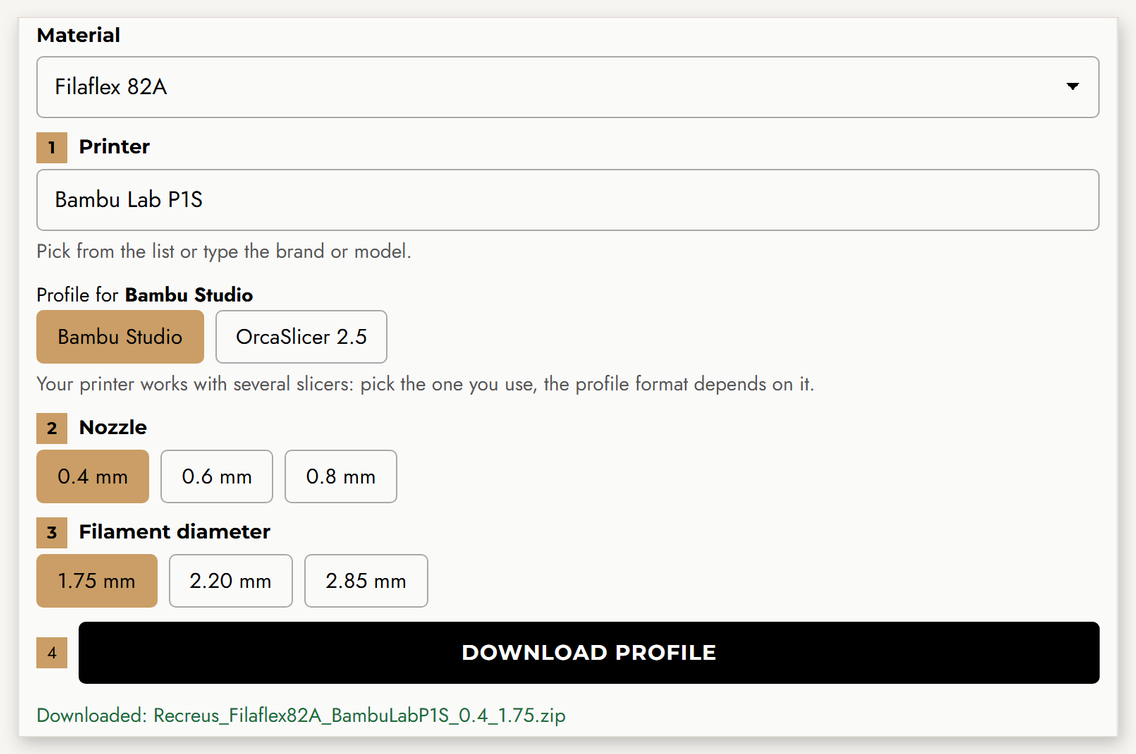
- Generate and download your profile above: printer, nozzle and diameter. You get a ZIP file.
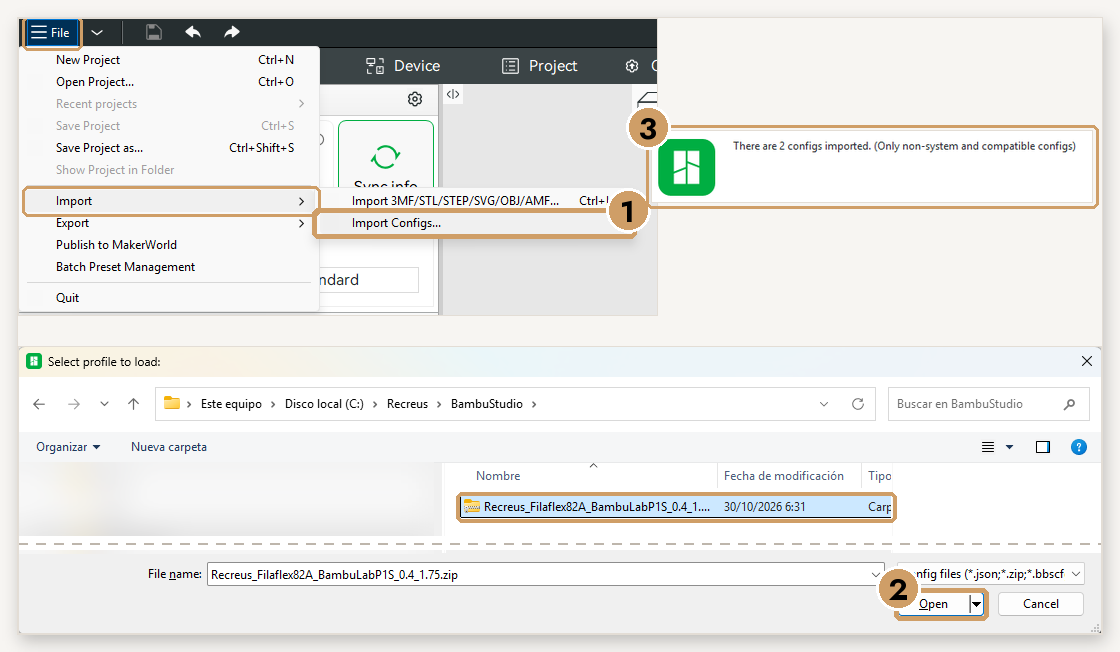
- Open Bambu Studio and go to File → Import → Import Configs… Select the downloaded ZIP (no need to unzip it) and click Open. You will see the message “2 configs imported”.
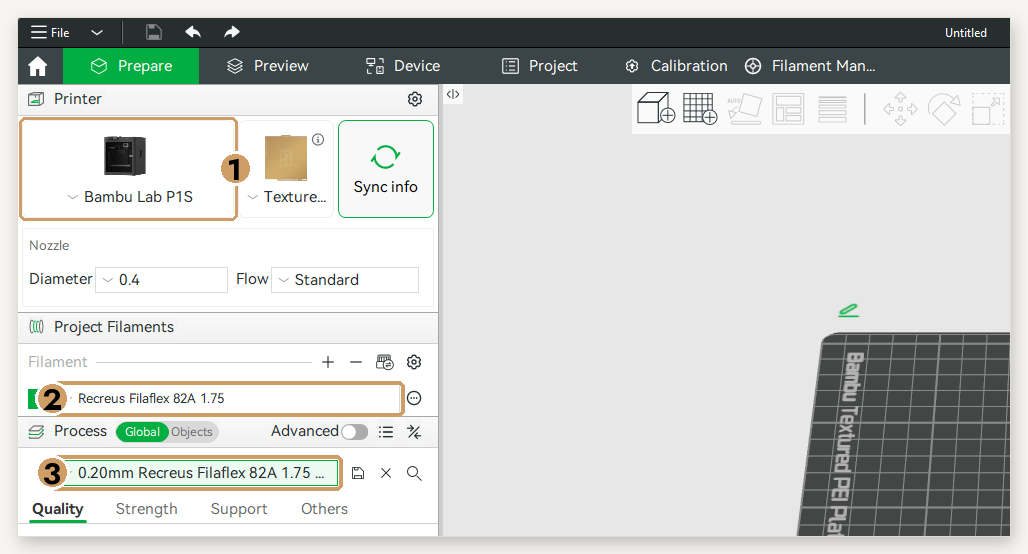
- Select your printer and, in Filament and Process, the Recreus profiles. Ready to slice!
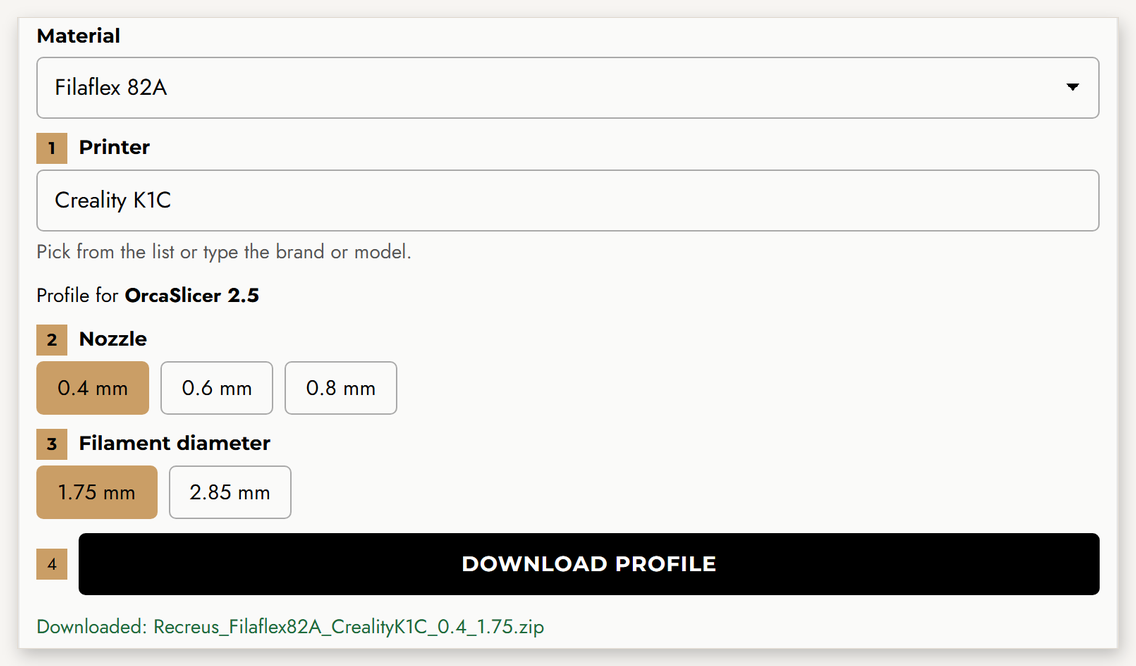
- Generate and download your profile above: printer, nozzle and diameter. You get a ZIP file.
- Open OrcaSlicer or Snapmaker Orca and go to File → Import → Import Configs… (not “Import ZIP Archive”). Select the downloaded ZIP and click Open. If your version does not accept it, unzip it and select the .json files.
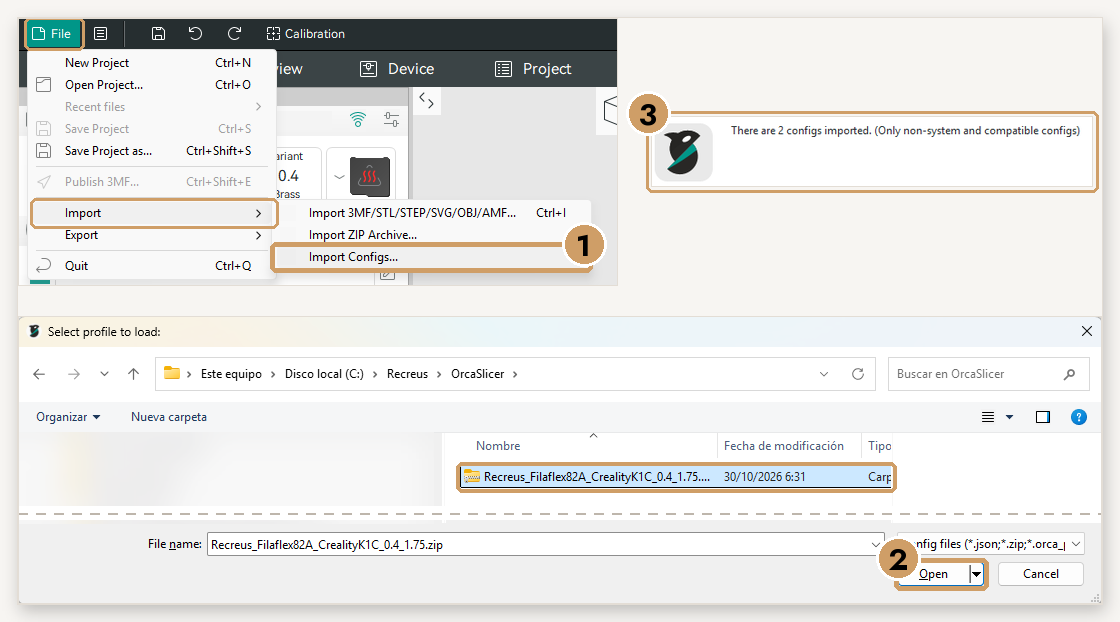
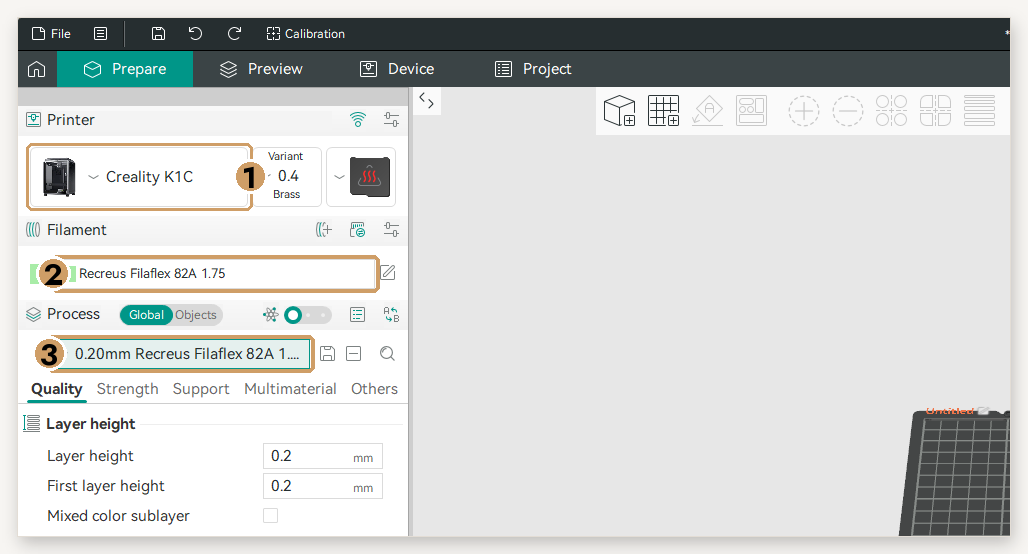
- Select your printer and, in Filament and Process, the Recreus profiles. On printers with several toolheads (Snapmaker U1), assign the filament to the toolhead where it is loaded.
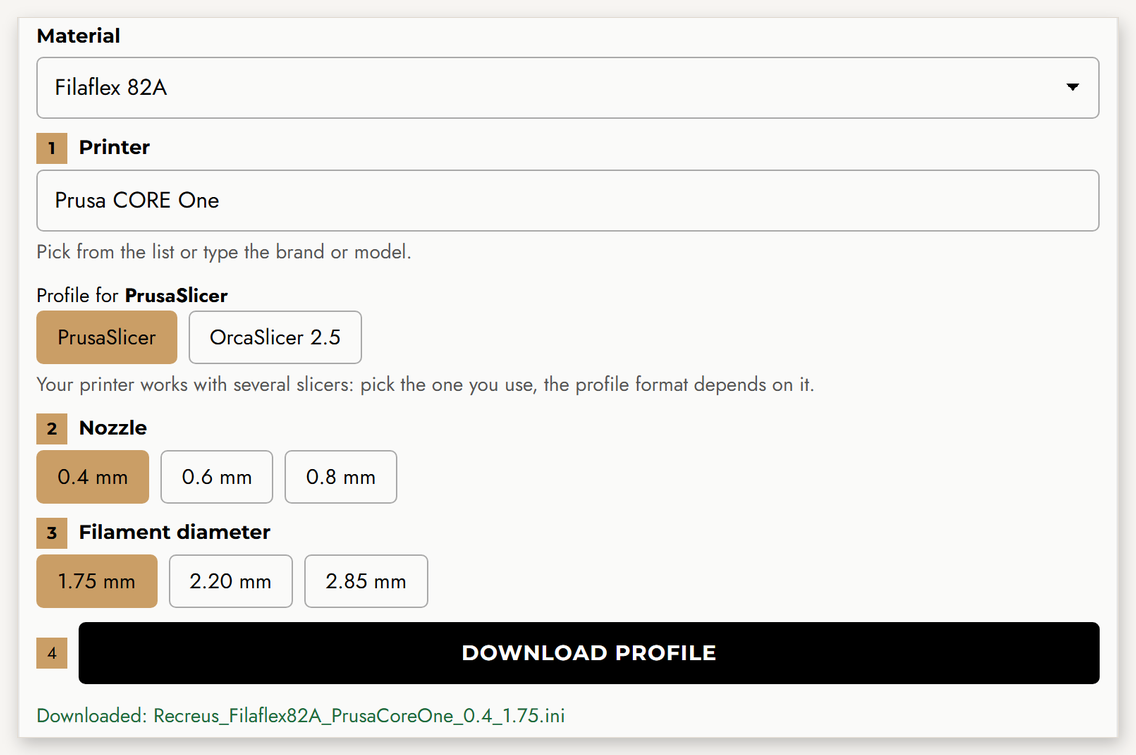
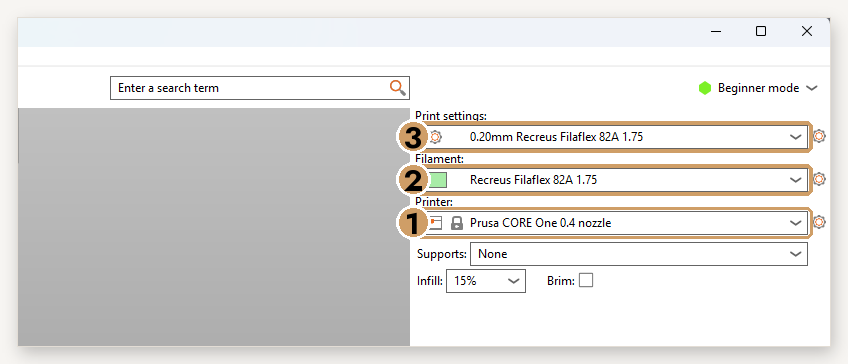
- Generate and download your profile above. For PrusaSlicer you get a single .ini file.
- Open PrusaSlicer, go to File → Import → Import Config Bundle… and pick the .ini file. You will see the message “2 presets successfully imported”.
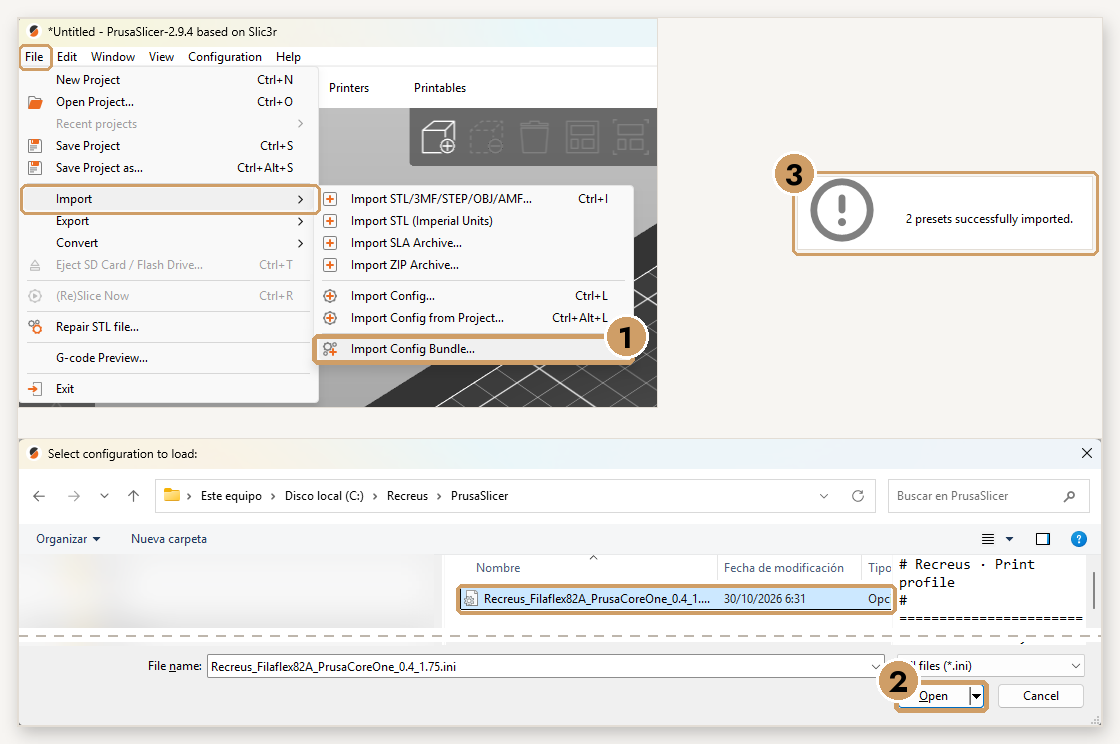
- In Printer, select your Prusa with the right nozzle and, in Filament and Print Settings, the Recreus profiles.
3. Your material
Every material has its own personality. Pick yours:
Filaflex 60A
Good to know
- Very soft: it needs a direct-drive extruder with a well-constrained filament path. Not recommended on bowden extruders.
- Print slowly and keep the filament dry: soft grades are the most sensitive to moisture and speed. The profile already limits the flow.
Temperatures, speeds, retraction, bed and fan depend on your printer and nozzle: they come already tuned in your profile.
Download the exact values for your printerDatasheets & certificates
Filaflex 70A
Good to know
- Very soft: it needs a direct-drive extruder with a well-constrained filament path. Not recommended on bowden extruders.
- Print slowly and keep the filament dry: soft grades are the most sensitive to moisture and speed. The profile already limits the flow.
Temperatures, speeds, retraction, bed and fan depend on your printer and nozzle: they come already tuned in your profile.
Download the exact values for your printerDatasheets & certificates
Filaflex 82A
Good to know
- A balance of flexibility and printability: the all-rounder of the range.
- Best on direct drive. On bowden extruders it can work at lower speed: the profile limits the flow automatically.
Temperatures, speeds, retraction, bed and fan depend on your printer and nozzle: they come already tuned in your profile.
Download the exact values for your printerDatasheets & certificates
Filaflex 95A
Good to know
- The easiest Filaflex to print and the most rigid of the range.
- Works on bowden extruders too (with the limited flow set by the profile) and faster on direct drive.
Temperatures, speeds, retraction, bed and fan depend on your printer and nozzle: they come already tuned in your profile.
Download the exact values for your printerDatasheets & certificates
Filaflex Foamy
Good to know
- Contains a foaming agent: at 100 % flow the line expands about 37.5 %. The profile already reduces the flow to compensate.
- More temperature or less flow = more foaming: the part gets lighter in weight and colour. Aim for a uniform colour across the print.
- For maximum weight reduction, lower the flow in 5 % steps (down to 60 %) and the volumetric speed by 10-15 %.
Temperatures, speeds, retraction, bed and fan depend on your printer and nozzle: they come already tuned in your profile.
Download the exact values for your printerDatasheets & certificates
Filaflex 95 Foamy
Good to know
- Contains a foaming agent: at 100 % flow the line expands about 37.5 %. The profile already reduces the flow to compensate.
- More temperature or less flow = more foaming: the part gets lighter in weight and colour. Aim for a uniform colour across the print.
- For maximum weight reduction, lower the flow in 5 % steps (down to 60 %) and the volumetric speed by 10-15 %.
Temperatures, speeds, retraction, bed and fan depend on your printer and nozzle: they come already tuned in your profile.
Download the exact values for your printerDatasheets & certificates
Filaflex Purifier
Good to know
- A balance of flexibility and printability: the all-rounder of the range.
- Best on direct drive. On bowden extruders it can work at lower speed: the profile limits the flow automatically.
Temperatures, speeds, retraction, bed and fan depend on your printer and nozzle: they come already tuned in your profile.
Download the exact values for your printerDatasheets & certificates
Filaflex SEBS
Good to know
- SEBS is a rubber-like thermoplastic elastomer with excellent layer adhesion and thermal stability.
- It needs a hot bed (around 75 °C; the profile sets it) and a draft-free environment: use an enclosure if you have one.
- Watch the first layers closely to ensure good adhesion.
Temperatures, speeds, retraction, bed and fan depend on your printer and nozzle: they come already tuned in your profile.
Download the exact values for your printerDatasheets & certificates
Conductive Filaflex
Good to know
- Electrically conductive TPU. Keep it especially dry.
- Conductivity depends on the geometry, layer orientation and contacts: test it on your own design.
Temperatures, speeds, retraction, bed and fan depend on your printer and nozzle: they come already tuned in your profile.
Download the exact values for your printerDatasheets & certificates
Reciflex
Good to know
- Behaves practically like Filaflex 95A: one of the easiest flexibles to print.
- Works on bowden extruders too (with the limited flow set by the profile) and faster on direct drive.
Temperatures, speeds, retraction, bed and fan depend on your printer and nozzle: they come already tuned in your profile.
Download the exact values for your printerDatasheets & certificates
PLA
Good to know
- Easy to print, with great surface quality and dimensional accuracy: ideal for prototypes, decorative parts and general use.
- Full part cooling from the second layer. It softens with heat (from about 50 °C): not for parts in the sun or hot environments.
Temperatures, speeds, retraction, bed and fan depend on your printer and nozzle: they come already tuned in your profile.
Download the exact values for your printerDatasheets & certificates
PLA Purifier
Good to know
- PLA with antibacterial properties and the same easy printing as standard PLA.
- Designed for hygiene-sensitive parts: check its datasheet and certificates for each application.
Temperatures, speeds, retraction, bed and fan depend on your printer and nozzle: they come already tuned in your profile.
Download the exact values for your printerDatasheets & certificates
PLA-LW
Good to know
- Contains a foaming agent that activates above 235 °C: the material expands and parts weigh much less. The profile prints at 70 % flow to compensate.
- More temperature (within range) = more foaming: lighter, more matte parts. Ideal for lightweight parts such as RC models: few walls and low infill.
- Keep retraction and travel fast: foamed material tends to ooze.
Temperatures, speeds, retraction, bed and fan depend on your printer and nozzle: they come already tuned in your profile.
Download the exact values for your printerDatasheets & certificates
PET-G HF
Good to know
- High-flow PETG: the profile allows up to 16 mm³/s on a 0.4 nozzle for fast, strong prints.
- It bonds very strongly to smooth PEI: use a textured plate or a release agent (glue stick). The Cool Plate is not recommended.
- Moderate cooling (around 40 %) keeps layer adhesion strong.
Temperatures, speeds, retraction, bed and fan depend on your printer and nozzle: they come already tuned in your profile.
Download the exact values for your printerDatasheets & certificates
PET-G CF
Good to know
- Carbon-fibre reinforced PETG: stiffer and more dimensionally stable, with a matte finish.
- It is abrasive: use a hardened steel nozzle (not brass).
- Little part cooling and a warm bed keep layers bonded; an enclosure helps on large parts.
Temperatures, speeds, retraction, bed and fan depend on your printer and nozzle: they come already tuned in your profile.
Download the exact values for your printerDatasheets & certificates
PP3D
Good to know
- Polypropylene: light, chemically resistant and fatigue resistant. Ideal for living hinges and durable parts.
- It does not stick to standard beds: apply PP3D Primer on clean glass (first layer at 40 °C) and remove the part while the bed is hot (around 85 °C).
- Minimal cooling and a draft-free environment reduce warping.
Temperatures, speeds, retraction, bed and fan depend on your printer and nozzle: they come already tuned in your profile.
Download the exact values for your printerDatasheets & certificates
Good to know
Why do our profiles use volumetric speed?
Volumetric speed (mm³/s) is how much plastic flows per second, like water through a hose. Flexible filaments have a flow limit: above it they slip or under-extrude. Our profiles set that limit for each material, nozzle and printer, and your slicer adapts the speed of every line automatically. That’s why there is no single speed table: the right speed depends on your nozzle and layer height.
Best practices
- Always keep the filament dry and store it sealed.
- Print several small parts at once: each layer gets more time to cool.
- When tuning, start from your profile and change one setting at a time.
Common problems
| Problem | Solution |
|---|---|
| Irregular or weak extrusion | Dry the filament · check the extruder tension · lower the volumetric speed by 10-20 % |
| Stringing | Dry the filament · increase travel speed · fine-tune retraction by ±0.5 mm |
| Poor adhesion | Clean the bed · slow first layer · use a glue stick on smooth plates |
| Jams or wraps around the extruder | Direct drive and external spool · check the filament path has no gaps |
Profiles are a starting point tuned by Recreus. Depending on your part’s geometry you may need to adjust speed, retraction or cooling.